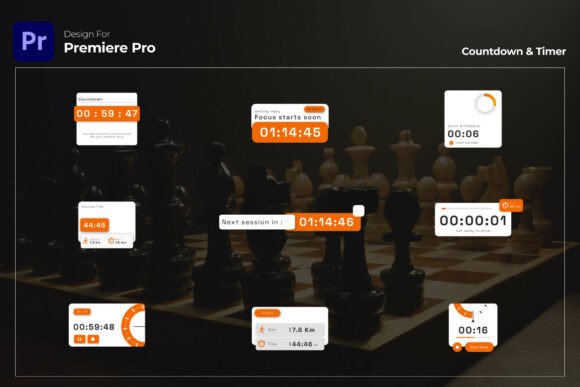
Countdown Timer Premiere Pro: Modern Video Pack
Creating engaging video content often comes down to pacing and visual clarity. Whether you are editing a high-intensity fitness tutorial, hosting a live webinar, or launching a new product, keeping your audience oriented in time is essential. A dedicated Countdown Timer Premiere Pro template solves this problem by providing a professional, plug-and-play solution for visual timing. Instead of building complex animations from scratch or relying on basic, outdated overlays, this pack offers a clean and modern aesthetic that integrates seamlessly into your existing workflow.
The primary appeal of this timer pack lies in its balance between simplicity and customization. It is designed for creators who need results quickly without sacrificing quality. For beginners, it removes the technical barrier of keyframe animation. For professionals, it saves hours of repetitive work. The value proposition is straightforward: you get a broadcast-quality timing tool that adapts to your brand identity, supports extended durations, and runs smoothly at high frame rates without requiring third-party plugins.
Practical Applications Across Different Niches
Visual timers are versatile tools that serve distinct purposes depending on the context. Understanding where to apply them can significantly improve viewer retention and engagement. This pack is engineered to handle a wide variety of scenarios beyond simple countdowns.
Fitness and Wellness Content
In workout videos, timing is everything. Viewers need to know exactly how long to hold a plank or when the next interval begins. Using a crisp, 60 FPS countdown timer ensures that the visual cue matches the physical exertion without distracting from the instructor. Because this pack supports up to one hour of duration, it is equally effective for short HIIT intervals and longer yoga flows. The ability to switch between countdown and stopwatch modes allows fitness creators to track active work time or rest periods with equal precision.
Live Events and Product Launches
Anticipation is a powerful psychological trigger. Before a live stream begins or a product reveal happens, a sleek countdown builds excitement. Unlike generic stock footage, this customizable timer allows you to match the specific color palette and typography of the event branding. This consistency reinforces brand recognition even during transitional moments. For marketers and entrepreneurs, this turns dead air into an opportunity for cohesive visual storytelling.
Educational and Instructional Videos
Educators and course creators often use timers to structure lessons or indicate quiz durations. A visible timer helps students manage their cognitive load and stay focused. The fully editable text design means you can add labels like "Quiz Time," "Break," or "Reading Period" directly onto the timer graphic. This reduces the need for separate title cards and keeps the visual flow uninterrupted.
Key Features That Enhance Workflow
When selecting a motion graphics asset, technical specifications matter just as much as aesthetics. This Countdown Timer Premiere Pro pack includes several features specifically chosen to streamline post-production.
- 60 FPS Ultra-Smooth Animation: Standard 30 FPS timers can sometimes look jittery, especially on modern high-refresh-rate displays. Rendering at 60 frames per second ensures that every second tick feels fluid and responsive, which is critical for professional-looking fitness and tech content.
- Dual Mode Functionality: Flexibility is built into the core logic. You can instantly toggle between counting down to zero or counting up from zero. This eliminates the need to purchase or download separate assets for stopwatches and countdowns.
- One-Click Color Control: Branding consistency shouldn't require digging through nested compositions. The color control feature allows you to update the entire timer’s appearance from a single panel, making it easy to create variations for different clients or video series.
- Universal Expressions: Language barriers in software can break projects. Universal expressions ensure that the timer functions correctly regardless of whether your After Effects or Premiere Pro installation is in English, Spanish, German, or any other supported language.
Customization Without Complexity
One of the most common concerns for editors using templates is the fear of being locked into a specific look. This pack addresses that by offering deep editability without requiring advanced coding knowledge. The text design is fully adjustable, meaning you are not stuck with the default font or layout. If your brand uses a bold sans-serif typeface or a specific kerning style, you can implement those changes directly.
Furthermore, the resolution is designed at 1920×1080 but is fully scalable. This vector-based approach means you can resize the timer for vertical social media reels, square Instagram posts, or ultra-wide YouTube thumbnails without losing sharpness. The "No Plugins Required" architecture is another significant advantage. Many premium effects rely on paid third-party extensions like Sapphire or Trapcode, which adds cost and compatibility issues. This pack relies entirely on native Adobe tools, ensuring that your project remains lightweight and portable across different workstations.
Technical Considerations Before You Begin
While this pack is user-friendly, there are important technical details to verify before integrating it into your timeline. Ensuring compatibility prevents frustration during tight deadlines.
- Software Version: This asset requires Premiere Pro CC 2023 or above. Users on older versions may encounter errors due to updated expression syntax or rendering engines. Always check your Creative Cloud app for updates before purchasing.
- Frame Rate Matching: Although the source file is 60 FPS, ensure your sequence settings align with your delivery platform. If you are editing a 24 FPS cinematic vlog, placing a 60 FPS timer may require interpretation rules to avoid playback speed issues. Conversely, for gaming or fitness content, maintaining a 60 FPS sequence will yield the best results.
- Expression Dependencies: While no external plugins are needed, the timer does use internal expressions to drive the time calculations. Do not delete or modify the hidden control layers unless you understand how they function, as this drives the dual-mode switching and auto-duration features.
Why Visual Timing Matters for Retention
Beyond mere utility, incorporating a high-quality countdown timer serves a strategic purpose in video marketing and education. It acts as a visual anchor that reduces viewer anxiety about time commitment. When an audience knows exactly how long a segment will last, they are more likely to watch until completion. In fitness, it provides a tangible goal; in webinars, it respects the viewer's schedule; in product launches, it amplifies emotional payoff.
By utilizing a dedicated Countdown Timer Premiere Pro pack, creators signal professionalism and attention to detail. The smooth animations and custom branding transform a functional element into a part of the overall viewing experience. Whether you are a solo freelancer managing multiple client styles or a business owner creating internal training materials, having a reliable, resizable, and plugin-free timer asset in your library is an investment in both efficiency and content quality.