Designing the Perfect Destination Wedding Invitation: A Guide to Editable Passport Templates
Planning a destination wedding is an exhilarating journey that blends romance with adventure. Unlike traditional local ceremonies, a destination wedding requires your invitation to serve a dual purpose: it must announce your union and act as a comprehensive travel guide for your guests. This unique challenge has given rise to one of the most creative trends in modern matrimonial stationery: the passport wedding invitation. Specifically, digital editable templates like the "Wedding Invitation 007" have revolutionized how couples approach this essential task. Understanding how to leverage these digital tools not only saves time and money but also ensures your guests receive clear, stylish, and functional information well before they pack their bags.
The Significance of the Passport Theme in Destination Weddings
When guests open a destination wedding invitation, they are mentally preparing for a trip. The design sets the tone for the entire experience. A passport-themed invitation is more than just a novelty; it is a semantic signal that immediately communicates "travel," "adventure," and "international celebration." This thematic consistency helps bridge the gap between the formal announcement and the logistical details of flying to a new location.
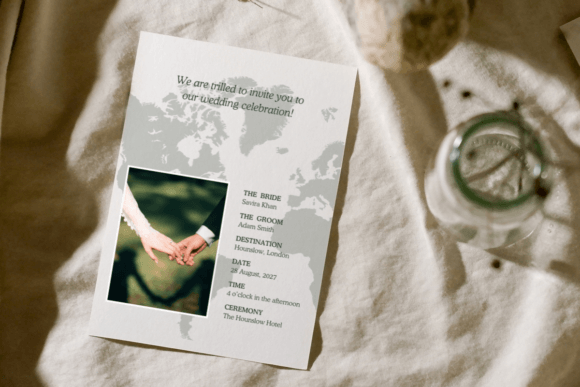
In the context of modern event planning, visual storytelling is paramount. Your invitation is the first chapter of your wedding narrative. By utilizing a 5×7″ template designed to mimic a passport or travel document, you create an immersive experience from the moment the email lands in an inbox or the card arrives in the mail. This approach aligns perfectly with the expectations of today’s travelers, who appreciate cohesive branding and intuitive design. It transforms a standard piece of stationery into a keepsake that reflects the spirit of exploration inherent in your celebration.
Understanding Digital-Only Templates: What You Are Buying
A common point of confusion for first-time buyers of digital stationery is understanding exactly what is being delivered. It is crucial to emphasize that items like Wedding Invitation 007 are DIGITAL ITEMS. No physical product will be shipped to your doorstep. Instead, you are purchasing access to a professional design framework that lives within the Canva ecosystem.
This distinction is vital for managing expectations and timelines. When you purchase this type of editable wedding invitation template, you receive a PDF file containing a secure link to the Canva template. This model offers several distinct advantages over traditional stationery:
- Instant Access: There is no waiting for shipping or proofing rounds with a designer. You can begin editing minutes after purchase.
- Cost Efficiency: You eliminate design fees and pre-printing costs, paying only for the paper and ink if you choose to print physically.
- Flexibility: Mistakes happen. With a digital template, correcting a typo or changing a venue detail takes seconds rather than requiring a costly reprint.
- Eco-Friendly Options: Because the file is digital, you have the option to send the final JPEG via email or text, reducing paper waste entirely.
Understanding this digital-first workflow empowers you to take full control of your stationery suite without the anxiety associated with traditional printing deadlines.
Navigating the Editing Process: Simplicity for Non-Designers
One of the primary barriers to entry for custom wedding stationery has always been the skill gap. Professional design software like Adobe Illustrator is powerful but intimidating. Modern editable templates bridge this gap by utilizing user-friendly platforms like Canva. The "Simple and Easy to Use" promise of templates like Wedding Invitation 007 is rooted in accessibility.
The workflow is designed to be intuitive regardless of your technical proficiency. After purchasing, the process follows a logical four-step path:
- Access the Template: Download the instruction PDF provided at checkout and click the link to access your specific Canva template.
- Account Setup: Log in or sign up for Canva. It is important to note that signing up is FREE; you do not need a premium subscription to edit these specific templates.
- Customize Your Design: Use the online editor on any device—phone, tablet, or computer—to make your changes.
- Export: Download your final design as a high-resolution JPEG for digital sharing or a PDF for printing.
This cross-device compatibility is particularly relevant for modern couples who may be planning their wedding during commutes, lunch breaks, or late-night sessions. The ability to tweak wording or adjust colors from a smartphone ensures that progress never stalls due to a lack of computer access.
What Can Be Customized?
Total creative control is the hallmark of a quality editable template. With the Wedding Invitation 007 design, every element is modular. All text on the design is fully editable, allowing you to adjust wording, font styles, colors, sizes, and placement to match your specific voice. Beyond basic text replacement, you can add new text boxes for additional travel details, such as hotel block codes or shuttle schedules. Furthermore, the template supports media integration, enabling you to add your own logo, engagement photos, or custom illustrations. This level of customization ensures that while the layout is professional, the content remains uniquely yours.
Best Practices for Printing and Digital Distribution
Once your design is finalized, the medium of delivery dictates the technical requirements. Whether you are sending a digital passport invite via email or handing out physical cards, quality matters.
Printing at Home vs. Professional Centers
If you opt for physical invitations, you have two main paths. Printing at home is convenient for small batches or last-minute additions. For best results, use heavy-weight, high-quality white card stock paper. Standard printer paper is too thin for a passport-style invite and diminishes the perceived value of the event. Always set your printer settings to "Highest Quality" or "Photo Paper" mode to ensure crisp text and vibrant colors.
For larger quantities or superior finish, sending your PDF to a professional print center is recommended. Local print shops or online services can handle heavier card stocks and offer finishes like matte or gloss that home printers cannot replicate. Because the template exports as a print-ready PDF, professional printers can easily accommodate the file without needing to adjust margins or bleed lines.
Digital Etiquette and Delivery
For the eco-conscious or budget-savvy couple, the JPEG export option transforms your passport wedding invitation into a digital asset. When sending digitally, consider the file size and readability on mobile screens. While the 5×7″ aspect ratio is standard for print, ensure your text remains legible when viewed as a thumbnail in a messaging app. Pairing the digital image with a dedicated wedding website link allows the invitation to serve as a beautiful visual hook while offloading dense logistical data to a web platform.
Common Misunderstandings About Editable Templates
Despite the growing popularity of digital stationery, misconceptions persist. Addressing these helps buyers make informed decisions.
Misconception: "I need to know graphic design to use this."
Reality: These templates are pre-designed. You are filling in blanks, not creating layouts from scratch. If you can type a document, you can edit this template.
Misconception: "Digital templates look cheap."
Reality: The output quality depends on the resolution of the download and the paper used for printing. A high-resolution PDF printed on premium cardstock is indistinguishable from professionally designed stationery.
Misconception: "I can only edit it once."
Reality: Canva templates save automatically. You can return to your design weeks later to update RSVP dates or correct spelling errors without repurchasing.
Why This Matters for Modern Event Planning
The shift toward editable destination wedding invites represents a broader change in how we manage life events. It prioritizes agility, personalization, and resourcefulness. In an era where travel logistics can change overnight, having an invitation that can be updated instantly is a practical necessity, not just a stylistic choice.
Furthermore, the passport wedding invitation serves as an educational tool for your guests. It subtly trains them to think about passports, visas, and travel documentation before they even receive their formal itinerary. By integrating function with form, templates like Wedding Invitation 007 do more than announce a date; they facilitate a smoother, more organized journey for everyone involved. Whether you are tech-savvy or a traditionalist looking for convenience, mastering the art of the editable digital invitation is a valuable skill for the modern host.