Evaluating Class of 2026 SVG and Graduation 2026 SVG Files for Custom Projects
As the academic year progresses, students, parents, and small business owners begin preparing for upcoming milestones. For the graduating cohort, digital assets like a Class of 2026 SVG or Graduation 2026 SVG serve as foundational elements for custom apparel, memorabilia, and celebration decor. These vector-based files are not merely decorative graphics; they are functional tools that enable precise cutting, printing, and sublimation. Understanding the technical specifications and practical applications of these files is essential for anyone evaluating whether to purchase a digital download for personal use or commercial production.
Defining the Digital Asset: What Is a Senior 2026 SVG?
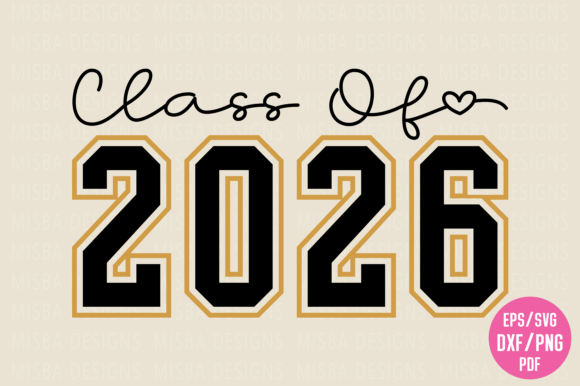
A Class of 2026 SVG is a scalable vector graphic specifically designed with graduation-themed typography and iconography. Unlike raster images such as JPGs, which lose quality when resized, SVG files utilize mathematical paths to define shapes and text. This allows a Senior 2026 Varsity design to be scaled from a small sticker to a large banner without pixelation. When evaluating these files, it is important to distinguish between true vector formats and high-resolution PNGs. While a 300 DPI PNG is suitable for sublimation printing on tumblers or mugs, only the SVG, EPS, or DXF formats provide the editable nodes required for vinyl cutting machines like Cricut or Silhouette.
These designs often feature specific aesthetic styles relevant to current trends. A Retro Senior design might utilize vintage color palettes and distressed textures, while a Collegiate style focuses on traditional varsity fonts and block lettering. The inclusion of multiple file types in a single digital bundle—typically EPS, SVG, DXF, PDF, and PNG—ensures compatibility across different software platforms and hardware devices.
Primary Use Cases and Applications
The decision to acquire a Graduation 2026 SVG usually stems from specific project requirements. Evaluating your intended application helps determine if a particular design meets your needs.
- Custom Apparel and Senior Shirts: The most common use for a Twenty 26 Senior file is creating personalized t-shirts. Vinyl cutters require clean, continuous paths found in SVG or DXF files to weed excess material efficiently. Complex gradients or shading in a design can complicate this process, making solid-color varsity styles preferable for iron-on vinyl.
- Sublimation Printing: For projects involving polyester fabrics or coated hard goods like tumblers, the included high-resolution PNG files are often more appropriate than vectors. Sublimation requires full-color data that standard cutting SVGs do not possess. Users should verify that the PNG resolution is at least 300 DPI at the desired print size to avoid blurriness.
- Paper Crafts and Stationery: Graduation party invitations, scrapbooking layouts, and gift tags benefit from the scalability of EPS and PDF formats. These files allow for precise alignment and layering in design software without the jagged edges associated with low-quality raster images.
- Commercial Merchandise: Small business owners frequently evaluate Graduation 2026 Shirt designs for inventory. In this context, verifying the commercial license terms is as critical as assessing the file quality. A design may be technically perfect but legally restricted to personal use only.
Benefits of Digital Vector Formats
Selecting a high-quality digital file offers distinct advantages over pre-printed merchandise or lower-quality free alternatives. The primary benefit is versatility. A single Senior 2026 SVG purchase provides the raw materials for dozens of different products. The same varsity font used on a senior shirt can be adapted for a car decal, a graduation cap topper, or a yard sign.
Technical compatibility is another significant factor. Reputable designers test their files across major platforms. An SVG optimized for Cricut Design Space may behave differently in Silhouette Studio or Adobe Illustrator. Bundles that include both SVG and DXF formats mitigate compatibility issues, as DXF files are universally recognized by cutting software even when native SVG support is lacking. Additionally, instant download availability eliminates shipping wait times, allowing for last-minute Senior Year projects or urgent gift creation.
Tradeoffs and Technical Considerations
While digital files offer flexibility, they also present specific challenges that buyers must evaluate. One common tradeoff involves editability. Not all SVG files are created equal. Some are flattened or outlined, meaning the text cannot be changed within cutting software. If you need to customize a Graduate design with a specific student name or school mascot, you must confirm that the text layers remain editable or that the designer provides separate element files.
File complexity also impacts usability. Highly detailed Retro Senior designs with intricate distressing may look excellent on screen but can be difficult to cut on vinyl. Tiny fragments may tear during weeding or fail to adhere properly. Conversely, simple Varsity Letters are easy to cut but may lack visual interest for sublimation projects. Buyers must balance aesthetic preference with the physical limitations of their chosen medium.
Furthermore, color management varies between formats. SVG files typically contain color information for layer organization rather than accurate print color matching. A design appearing navy blue in a browser may cut as black vinyl because the machine assigns colors based on layer order. Users working with sublimation PNGs should also be aware that screen colors (RGB) differ from printed colors (CMYK), potentially requiring adjustment before production.
Evaluating Fit: When to Choose This Resource
A Class Of School digital asset is a strong fit for individuals who possess basic familiarity with design software or cutting machines and desire customization. It is ideal for those creating cohesive themes across multiple items, such as matching senior shirts and graduation party decor. The format supports both hobbyist exploration and small-scale commercial production, provided licensing aligns with usage.
This resource is particularly valuable for time-sensitive projects. Because the files are digital and instantly available, they accommodate the unpredictable schedule of senior year events, from the last day of school to graduation ceremonies. The ability to iterate quickly—resizing, recoloring, and rearranging elements—makes digital assets superior to static templates for personalized gifting.
When Alternatives May Be Preferable
Despite their utility, downloadable SVGs are not the optimal solution for every situation. Individuals without access to cutting machines or sublimation printers may find better value in purchasing finished goods. The learning curve associated with troubleshooting file imports, adjusting cut settings, and managing color profiles can be prohibitive for one-time users.
Additionally, those requiring highly specific institutional branding should exercise caution. Generic Graduation 2026 SVG files rarely include trademarked university logos or official school mascots due to intellectual property restrictions. If official licensure is required, buyers must source approved vendors rather than general marketplaces. Similarly, professional print shops preparing bulk orders for an entire graduating class may prefer print-ready PDFs or AI files with proper bleed and crop marks over craft-oriented SVG formats designed for home equipment.
Making an Informed Selection
Evaluating a Senior 2026 Svg requires looking beyond the preview image. Prospective buyers should examine product descriptions for specific file inclusions, confirming the presence of formats compatible with their equipment. Checking reviews for mentions of node count, layer organization, and ease of weeding provides insight into real-world performance. Understanding the distinction between personal and commercial licenses prevents legal complications for business users.
Ultimately, the value of a Graduation 2026 Gift design lies in its alignment with the user's technical capabilities and creative goals. By carefully assessing file specifications, intended applications, and potential limitations, makers can select digital assets that enhance rather than hinder their graduation celebrations. Whether creating a singular keepsake or a product line, informed evaluation ensures the final result honors the significance of the Class of 2026 milestone.