Honey Drip Text Effect: Editable PSD Guide
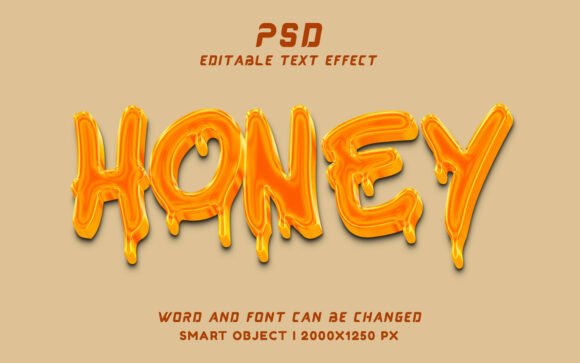
Creating visually arresting typography often requires hours of manual brush work, layer styling, and texture mapping. For designers working on tight deadlines or those who lack advanced digital painting skills, achieving a realistic liquid aesthetic can be a significant bottleneck. The Honey Drip Text Effect – Editable PSD addresses this specific challenge by encapsulating complex gloss, shadow, and fluid dynamics into a single, non-destructive workflow. Rather than building the effect from scratch for every project, this resource allows creators to leverage pre-built Smart Objects to generate professional-grade, sweet-themed typography in seconds. Understanding how to utilize this tool effectively can transform your approach to food branding, children’s media, and playful advertising campaigns.
Streamlining Workflow with Smart Object Technology
The core value of the Honey Drip Text Effect – Editable PSD lies in its technical architecture. Unlike rasterized text effects that permanently alter pixels and prevent future editing, this file utilizes Photoshop Smart Objects. This distinction is critical for professional workflows. When you double-click the designated Smart Object layer, a new document window opens containing a placeholder text layer. You simply type your desired copy, save the document, and return to your main canvas to see the honey effect automatically applied to your new text.
This non-destructive editing capability offers tangible efficiency gains. If a client requests a spelling change or wants to test three different headlines for an A/B social media campaign, you do not need to rebuild the dripping effect. You merely update the source text. Furthermore, because the effect is generated through layer styles and masks linked to the Smart Object, it maintains vector-like scalability within the 2000×1250 px workspace. This ensures that whether you are designing a small web banner or a large-format poster, the glossy highlights and viscous drips remain crisp and high-quality at 300 DPI.
Elevating Food Branding and Packaging Design
In the culinary and confectionery sectors, visual texture communicates flavor before the consumer reads a single word. The human brain associates glossiness and viscosity with freshness, sweetness, and indulgence. Applying the Honey Drip Text Effect – Editable PSD to product packaging or menu boards creates an immediate sensory connection that flat typography cannot achieve. For example, a bakery promoting a new glazed donut line can use this effect to mirror the actual texture of the product, reinforcing brand consistency between the physical item and the marketing collateral.
However, practical application requires restraint. While the effect is designed to look delicious, it must remain legible. When using this style for packaging, ensure the base font weight is substantial enough to support the added volume of the honey drips. Thin serifs may become obscured by the liquid overlay. The included free font link provides a typeface specifically tested for compatibility with this effect, serving as a safe starting point. If you choose a custom typeface, opt for bold sans-serifs or rounded display fonts that complement the organic flow of the honey rather than fighting against it.
Enhancing Engagement in Children’s Media
Beyond food marketing, this aesthetic serves a distinct purpose in educational and entertainment design for younger audiences. Children respond strongly to bright colors, tactile textures, and playful shapes. The Honey Drip Text Effect – Editable PSD introduces a level of whimsy that standard vector text lacks, making it ideal for birthday party invitations, classroom worksheets, storybook covers, and kids' YouTube thumbnails. The glossy finish catches attention on screens, which is particularly valuable for digital content competing in crowded feeds.
For educators and parents creating DIY learning materials, this tool simplifies the production of engaging visuals without requiring graphic design expertise. Instead of searching for generic clip art, users can create custom headers for spelling lists or math games that feel bespoke and exciting. The ability to edit the text means the same PSD file can serve multiple purposes throughout the year—transforming from "Summer Camp" signage to "Halloween Treats" labels with zero additional design time.
Technical Specifications and Quality Assurance
When integrating stock assets into professional deliverables, resolution and color fidelity are non-negotiable. This Honey Drip Text Effect – Editable PSD is configured at 300 DPI with dimensions of 2000×1250 pixels. This specification strikes a balance between versatility and performance. It is sufficiently large for most print applications, including flyers, magazine ads, and standard packaging faces, while remaining manageable for screen-based work without causing excessive lag in Photoshop.
The 300 DPI standard ensures that when printed, the subtle gradients in the honey—from deep amber shadows to bright white specular highlights—render smoothly without banding or pixelation. For web use, you can scale the image down significantly while retaining sharpness, which aids in optimizing page load speeds. Always verify your final output settings; if exporting for Instagram or Facebook, convert the color profile to sRGB to prevent the rich golden tones from shifting or appearing dull on mobile devices. The PSD itself typically works in RGB mode for maximum vibrancy, but designers preparing for offset printing should consult their printer regarding CMYK conversion to maintain color accuracy.
Customization Strategies for Unique Results
While the Honey Drip Text Effect – Editable PSD provides a polished baseline, relying solely on default settings can lead to repetitive designs across projects. To maximize the asset's utility, treat it as a foundation rather than a final solution. After applying your text via the Smart Object, consider adding adjustment layers above the effect group. A Hue/Saturation layer can shift the gold tone toward maple syrup brown, strawberry red, or even neon green for slime-themed projects. Curves adjustments can increase contrast to make the liquid appear wetter or decrease it for a matte, waxy look.
Additionally, blending modes offer powerful customization. Placing a noise texture overlay set to "Soft Light" can give the honey a more organic, natural imperfection, reducing the plastic-like sheen that sometimes occurs with digital effects. Conversely, adding a subtle outer glow can enhance readability against dark backgrounds. These minor modifications allow you to adapt the single PSD file to diverse brand identities, ensuring that each project feels tailored rather than templated.
Evaluating Fit and Practical Limitations
No design asset is universally appropriate, and understanding the limitations of the Honey Drip Text Effect – Editable PSD prevents misuse. This style is inherently informal and decorative. It is generally unsuitable for corporate finance, legal services, luxury fashion, or somber memorial content where clarity and seriousness take precedence over playfulness. Using a dripping honey effect in these contexts could undermine credibility and confuse the audience regarding the brand's tone.
Legibility is another functional constraint. The very nature of a drip effect adds visual noise around letterforms. Long paragraphs or dense blocks of text rendered in this style will be difficult to read. Reserve this effect strictly for headlines, logos, short phrases, or call-to-action buttons. Pair it with clean, highly readable body copy to maintain information hierarchy. Also, consider the background complexity; because the honey relies on transparency and lighting effects, placing it over busy photographic backgrounds may reduce contrast. In such cases, adding a solid color shape or gradient behind the text can provide necessary separation and ensure the glossy details pop.
Maximizing Value Across Projects
For freelancers and agency designers, the return on investment for the Honey Drip Text Effect – Editable PSD comes from repeated, varied application. By mastering the Smart Object workflow and exploring customization techniques, this single file becomes a versatile component of your creative toolkit. It solves the specific problem of needing high-impact, thematic typography without the overhead of custom illustration. Whether you are refreshing a restaurant's seasonal menu, designing a viral social post for a candy brand, or crafting personalized party stationery, the ability to instantly deploy a professional liquid text effect supports both creative ambition and business efficiency.
Ultimately, the goal is to enhance communication through visual metaphor. When used thoughtfully, this effect does more than decorate; it evokes taste, memory, and emotion. By respecting its stylistic boundaries and leveraging its technical flexibility, designers can create work that is not only visually sweet but strategically effective. Remember to always check licensing terms for commercial use and verify that the included free font meets your project's distribution requirements to ensure a smooth, compliant delivery.