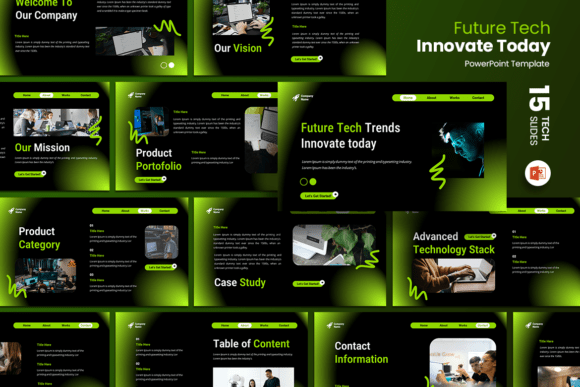
Black Modern Technology PowerPoint: Sleek Design Guide
In the competitive landscape of digital presentations, visual authority matters as much as the content itself. The Black Modern Technology PowerPoint template offers a sophisticated solution for professionals who need to convey innovation without sacrificing clarity. This is not merely a collection of dark slides; it is a strategic design framework built to highlight data, showcase products, and tell compelling stories against a high-contrast backdrop. For creators, marketers, and entrepreneurs, this template serves as a foundational tool that bridges the gap between complex technical information and accessible visual communication.
The aesthetic choice of a dark theme is deliberate. In modern UI/UX and presentation design, dark modes reduce eye strain during prolonged viewing and allow vibrant accent colors to pop with greater intensity. When presenting technology-related content, this visual language signals premium quality and forward-thinking professionalism. Whether you are pitching a SaaS startup or displaying a photography portfolio, the underlying structure of this template ensures your message remains the focal point, unencumbered by unnecessary decorative clutter.
Versatile Applications Across Industries
While the name suggests a niche focus on tech, the structural versatility of the Black Modern Technology PowerPoint makes it applicable across a wide spectrum of professional fields. The 15 included slides are designed as modular components rather than rigid sequences, allowing users to adapt the narrative flow to their specific objectives.
- Creative Agencies and Portfolios: The minimalist dark background acts as a gallery wall, making visual work stand out. Photographers and designers can use the image placeholders to create immersive case studies where the artwork takes precedence over text.
- Startup Pitch Decks: Investors review hundreds of decks annually. A clean, modern aesthetic helps maintain engagement. The template includes dedicated layouts for problem-solution narratives, market sizing, and team introductions that look polished and investor-ready.
- Corporate Reporting: Transform dry quarterly data into digestible insights. The high-contrast charts and graphs available in this template improve readability in dimly lit conference rooms or during screen-sharing sessions.
- Educational Workshops: Tech educators can leverage the structured layouts to break down complex coding concepts or engineering principles into step-by-step visual guides that keep students focused.
Streamlining Workflow with Editable Assets
Time is often the scarcest resource for freelancers and business owners. This template prioritizes efficiency through its fully editable architecture. You do not need advanced graphic design skills to achieve a custom look. The drag-and-drop image functionality eliminates the frustration of manual resizing and alignment, ensuring that every photo fits perfectly within the designated frame while maintaining aspect ratio and resolution.
Customization extends beyond imagery. Every text box, shape, and line is unlocked for modification. This means you can align the typography and color palette strictly with your brand guidelines. If your company uses a specific shade of neon blue or electric green, swapping the default accent colors takes only moments. This level of adaptability ensures that the final output feels bespoke rather than generic, reinforcing brand identity throughout the presentation.
Optimizing Visual Hierarchy and Readability
Working with dark backgrounds requires a disciplined approach to contrast and spacing. To maximize the effectiveness of the Black Modern Technology PowerPoint, adhere to principles of visual hierarchy. White or light gray text should be used for primary content to ensure maximum legibility. Reserve brighter, saturated colors exclusively for calls to action, key data points, or section headers. This selective use of color guides the viewer’s eye naturally through the slide, preventing cognitive overload.
The 16:9 aspect ratio is the industry standard for modern displays, but it also demands careful composition. Avoid filling every inch of negative space. The "black" in this template is active space; it provides breathing room that makes dense information feel manageable. When editing the unique custom slides, resist the urge to increase font sizes unnecessarily. Trust the layout. Clean lines and ample margins communicate confidence and organization more effectively than bold, crowded text blocks.
Technical Specifications and File Management
Understanding what is included in the main file helps set realistic expectations for your project workflow. The download provides a PPTX file optimized for the 16:9 ratio, compatible with both Microsoft PowerPoint and Keynote (via export). It is crucial to note that stock images are not included. This exclusion is actually a benefit; it prevents legal ambiguity regarding licensing and encourages you to source authentic visuals that genuinely represent your brand or product.
The template utilizes free fonts, removing another barrier to entry. You will not encounter missing font errors when opening the file on a different computer or sharing it with colleagues. This portability is essential for collaborative environments where multiple stakeholders may need to review or edit the deck. Before finalizing your presentation, always test the file on the actual display equipment you intend to use. Dark themes can render differently across various projector types and monitor calibrations, so a quick rehearsal ensures your contrast ratios hold up in the real-world environment.
Strategic Content Adaptation
A beautiful template cannot fix weak content, but it can amplify strong messaging. When adapting the Black Modern Technology PowerPoint for your needs, start by auditing your existing material. Identify the core narrative arc before selecting slides. If you are building a company profile, prioritize the "About Us," "Mission," and "Services" layouts. For a product launch, focus on feature breakdowns and user testimonials.
Consider the emotional tone you wish to convey. Dark themes inherently suggest seriousness, luxury, and futurism. If your content is lighthearted or playful, you may need to soften the aesthetic by introducing rounded shapes, warmer accent colors, or candid photography to balance the mood. Conversely, if you are presenting cybersecurity protocols or financial forecasts, lean into the sharp geometry and cool tones to reinforce trust and precision.
Maintaining Consistency Across Variations
One common pitfall when using pre-made templates is inconsistent styling across edited slides. Establish a master style guide before you begin heavy customization. Define your header sizes, body text weights, and bullet point styles early. Use the Slide Master view in PowerPoint to apply global changes to fonts and logos, ensuring that every new slide you add or modify adheres to the same visual rules. This consistency builds subconscious trust with your audience, signaling that your organization pays attention to detail.
Remember that the goal of using a resource like the Black Modern Technology PowerPoint is to enhance communication, not just to decorate it. Every design choice should serve the content. If a unique custom slide looks impressive but distracts from your key metric, simplify it. The most effective presentations are those where the design becomes invisible, leaving only the idea clearly illuminated against the dark canvas. By treating this template as a flexible instrument rather than a fixed constraint, you unlock its full potential to elevate your professional storytelling.