Canva Frame Template, Brush Stroke Canva: A Practical Guide to Artistic Photo Collages
Creating a cohesive visual identity often requires balancing professional polish with organic creativity. This is where a Canva Frame Template, Brush Stroke Canva design becomes invaluable. Unlike rigid grid layouts, brush stroke frames introduce texture, movement, and a hand-painted aesthetic that softens digital imagery. For entrepreneurs, bloggers, and content creators, this specific style bridges the gap between structured marketing materials and authentic artistic expression. However, simply purchasing or downloading a template does not guarantee a successful result. Many users overlook the technical nuances of frame manipulation and file management, leading to designs that look amateurish rather than intentional.
Understanding how to properly leverage these templates ensures your final output maintains high resolution and visual integrity. Whether you are designing social media graphics, digital invitations, or portfolio displays, avoiding common pitfalls will save you time and preserve the quality of your brand assets.
Common Misunderstandings When Using Brush Stroke Frames
The most frequent error occurs during the image placement phase. Users often treat brush stroke frames like standard rectangular placeholders. In reality, organic shapes require a different approach to composition. Because the edges are irregular and textured, centering a subject perfectly in the geometric middle of the frame often results in awkward cropping where essential details are lost behind the brush texture.
Better Approach: Always utilize the double-click function after dropping an image into the frame. This activates the crop adjustment mode, allowing you to reposition and scale the photo independently of the frame boundary. With brush stroke designs, it is often better to slightly zoom out on the image to ensure negative space exists around the focal point. This prevents the textured edges from visually competing with the subject matter.
Overlooking Font Pairing and Hierarchy
A Brush stroke Canva Frame Template carries significant visual weight due to its texture and color. A common mistake is pairing these bold elements with equally heavy or decorative typography. When both the frame and the font demand attention, the design becomes cluttered and difficult to read. This is particularly problematic for small business owners creating promotional materials where legibility is paramount.
To maintain balance, opt for clean sans-serif or simple serif typefaces when using intricate brush frames. Let the frame serve as the primary decorative element while the text provides clear, accessible information. If you must use a script font, ensure it is reserved only for short headlines and never for body copy. Adjusting line height and letter spacing can also prevent text from feeling cramped against the organic edges of the brush artwork.
Navigating Digital Downloads and File Access
Since this product is a digital download, misunderstanding the delivery method can cause unnecessary frustration. Buyers sometimes expect an immediate attachment in their email or assume they have purchased a physical print. Clarifying this process beforehand prevents disappointment and support delays.
- Check Spam Folders: Automated emails containing PDF access links frequently trigger spam filters. If you do not see the confirmation within minutes, check your junk folder before contacting support.
- PDF vs. Editable File: The downloaded file is typically a PDF document containing a secure link to the actual Canva template, not the template itself. You must click this link while logged into your Canva account to create a working copy.
- Account Requirements: While Canva is free, some templates utilize Pro elements. Verify whether the Canva Frame Template, Brush Stroke Canva design uses free or premium assets before committing if you are on a free plan. Substituting Pro elements with free alternatives is possible but may alter the original aesthetic.
Export Settings That Compromise Quality
Even a beautifully edited design can fail if exported incorrectly. Brush strokes rely on subtle gradients and edge definition that are easily destroyed by aggressive compression. Exporting complex artistic templates as low-quality JPGs for web use often results in pixelation and color banding.
For digital display, PNG format is generally superior for brush stroke aesthetics as it preserves transparency and sharp edges without compression artifacts. If you require a PDF for printing, select "PDF Print" rather than "PDF Standard" to ensure 300 DPI resolution. Always review the export settings dialog box; taking an extra ten seconds to verify quality parameters prevents having to redesign or re-export later.
Customization Best Practices for Brand Consistency
Fully customizable templates offer freedom, but unlimited editing options can lead to brand inconsistency. Changing every color and font to match a momentary whim dilutes visual recognition. Instead of treating each project as isolated, use the template’s flexibility to reinforce established branding guidelines.
Before editing, identify which elements of the Brush stroke Canva Frame Template align with your existing palette. Use the eyedropper tool to sample colors directly from your uploaded photos or brand kit rather than guessing shades. This creates harmony between the new artistic frame and your proprietary content. Additionally, save your customized version as a new template within Canva. This allows you to reuse the adjusted layout for future campaigns without starting from scratch or accidentally altering the master file.
Evaluating Template Versatility Before Purchase
Not all brush stroke templates serve the same purpose. Some are optimized for Instagram stories with vertical orientations, while others suit landscape blog headers or square thumbnails. Assessing the intended application before downloading avoids wasted resources.
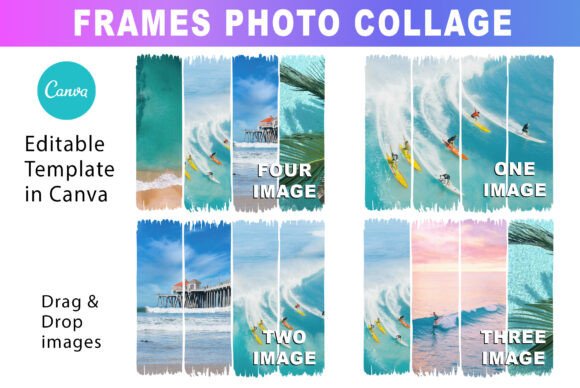
Review the product preview images critically. Do the example photos show diverse use cases, or only one specific scenario? Check the dimensions listed in the description to confirm compatibility with your target platform. A template designed for print postcards may not translate well to mobile screens without significant restructuring. Understanding these constraints upfront ensures the asset integrates smoothly into your existing workflow.
Maintaining Design Integrity During Editing
When replacing placeholder images, users sometimes stretch or distort photos to fit the brush frame. This distortion undermines the professional appearance of the collage. Canva frames automatically mask images, but they do not always preserve aspect ratios perfectly when dragging new content in.
Always monitor the image proportions during replacement. If a portrait-oriented photo is forced into a landscape-oriented brush stroke, the resulting squeeze effect looks unprofessional. Crop source images to approximate the frame’s orientation before insertion, or choose photos that naturally complement the frame’s shape. Respecting the geometry of the artwork demonstrates attention to detail that audiences subconsciously appreciate.
By approaching Canva Frame Template, Brush Stroke Canva designs with technical awareness and strategic intent, creators can produce stunning visuals that feel both artistic and professional. Avoiding these common errors transforms a simple template into a powerful communication tool that enhances rather than distracts from your message.