Round Cup Care Instruction Card Template: A Practical Guide to Customization and Printing
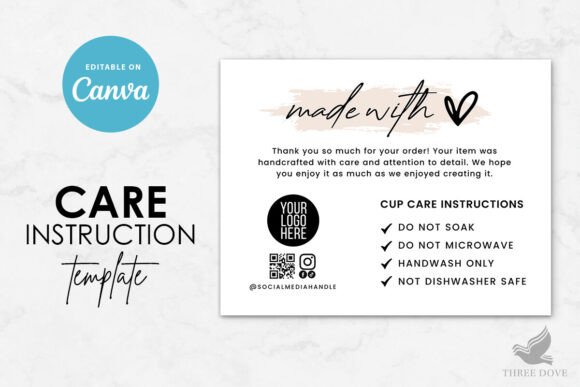
Elevating the unboxing experience for handmade tumblers, ceramic mugs, or custom drinkware often comes down to the smallest details. A well-designed care card not only protects your product’s longevity but also reinforces your brand's professionalism. The Round Cup Care Instruction Card Template offers a streamlined solution for creators who need polished, circular instructional inserts without hiring a graphic designer. Because this resource is a fully customizable Canva template, it allows for immediate editing on any device, eliminating the learning curve associated with complex vector software. However, the ease of access can sometimes lead to oversight. Understanding how to properly leverage this digital asset ensures that your final printed result matches the quality of the drinkware it accompanies.
Understanding the Digital Format and Compatibility
One of the most frequent hurdles for first-time users of digital templates is assuming cross-platform compatibility. It is vital to recognize that the Round Cup Care Instruction Card Template is exclusively designed for Canva. You cannot edit this file in Microsoft Word, Adobe Illustrator, Photoshop, or Google Docs. Attempting to force these files into unsupported software will result in formatting errors, missing elements, or an inability to open the file entirely. This distinction matters because your workflow depends entirely on having a free or pro Canva account.
Before purchasing or downloading, verify that you are comfortable working within the Canva interface. The template includes a tutorial PDF specifically to bridge knowledge gaps, but skipping this resource is a common misstep. The tutorial outlines layer management and text replacement techniques that prevent accidental design shifts. By treating the platform limitation as a feature rather than a restriction, you gain access to cloud-based editing that syncs across your PC, tablet, and mobile device, allowing you to make last-minute adjustments even when away from your primary workstation.
Managing Artwork and Color Limitations
Customization freedom is high with this template, but it is not absolute. A practical warning for users involves the pre-existing artwork. While you can resize, move, or delete graphical elements, the specific colors of the included illustrations are generally not editable. This is a crucial detail for brand consistency. If your brand palette requires a specific shade of sage green and the template features navy blue line art, you must plan around this constraint.
Rather than trying to recolor locked vectors, which often leads to pixelation or messy overlays, use the background and text customization options to create harmony. You can change background colors, upload your own logo, or add new images that match your aesthetic. Many successful sellers use the fixed artwork as a neutral anchor and adjust their typography and background hues to align with their packaging. Recognizing what can and cannot be changed upfront saves hours of frustration and prevents the creation of a disjointed design that looks patched together.
Navigating Print Specifications and Sizing
The template is sized at 1000 x 1000 pixels, which is optimized for digital viewing and standard home printing. However, pixel dimensions do not always translate directly to physical inches without verification. A common error occurs when users assume this resolution will automatically fit a specific cup base or packaging box without measuring. Always check the actual print size settings in Canva before exporting. Depending on your printer’s margins and paper size, you may need to scale the design during the print dialogue or adjust the canvas size slightly to accommodate bleed areas.
Furthermore, color variance is an inevitable reality of DIY printing. Screens emit light using RGB color profiles, while printers use CMYK ink or toner. The vibrant teal you see on your monitor may print as a muted blue-green. To avoid wasting expensive cardstock, always print a test copy on the exact paper stock you intend to use for the final run. This step allows you to adjust brightness or contrast in Canva to compensate for your specific printer’s quirks. Professional printing companies may also have different color profiles than home inkjets, so requesting a proof from your vendor is a wise investment if you are outsourcing production.
Content Strategy and Readability
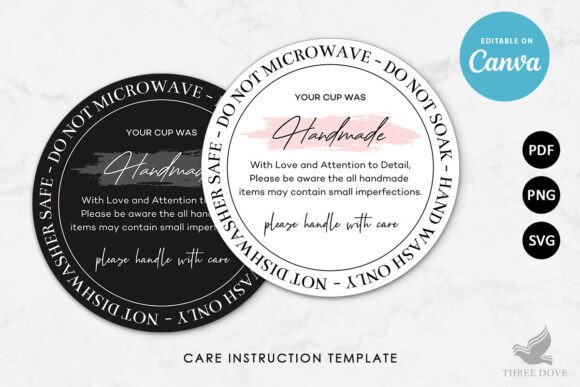
Having an editable template does not guarantee effective communication. The round shape presents unique layout challenges compared to rectangular cards. Text placed too close to the curved edge risks being trimmed off or becoming illegible. When editing the wording, font size, and placement, prioritize hierarchy over decoration. Essential information like "Hand Wash Only" or "Do Not Microwave" should be prominent and centered, while secondary details can follow the curve or sit in smaller type.
Another overlooked aspect is the utilization of the back side. The template allows you to add a reverse page, yet many creators leave it blank. This is wasted real estate. Use the back for social media handles, website URLs, discount codes for future purchases, or extended warranty information. Since you can make unlimited edits with no expiration, there is no rush to finalize the content immediately. Test different layouts and gather feedback from peers before committing to a print run. Remember that clarity drives customer satisfaction; a beautiful card that fails to convey care instructions defeats its primary purpose.
File Formats and Post-Download Workflow
Upon completing your design, selecting the correct export format is just as important as the design process itself. The package includes PDF, PNG, and SVG options, each serving a distinct function. For printing at home or at a local shop, the PDF Print version is typically superior as it preserves vector sharpness and embeds fonts. PNG files are better suited for digital listings or mockups, while SVGs are useful if you plan to cut the design on a vinyl cutter or import it into other vector-compatible tools later.
Downloading the wrong format can lead to blurry text or jagged edges on the final physical card. Additionally, ensure you have flattened transparency if your printer requests it, although Canva’s PDF export usually handles this well. Keep your master file saved within Canva for future updates. Seasonal changes, rebranding efforts, or updated care guidelines can be implemented instantly without starting from scratch. This long-term utility is where the true value of a digital template lies, transforming a one-time purchase into a recurring asset for your business.
Making Informed Decisions Before Purchase
Before adding the Round Cup Care Instruction Card Template to your cart, conduct a brief audit of your current needs. Confirm that the 1000 x 1000 px dimension provides sufficient resolution for your intended print size. Verify that the included artwork style complements your existing branding rather than clashing with it. Ensure you have access to Canva and understand that no physical item will be shipped to you. These checks take only moments but prevent buyer’s remorse and project delays.
Ultimately, this DIY template serves as a foundation, not a finished product. Its effectiveness depends entirely on your attention to technical details and design principles. By respecting the software limitations, testing print outputs rigorously, and utilizing the available space strategically, you transform a simple digital download into a professional touchpoint that enhances your product’s perceived value. Approach the customization process with patience and precision, and the resulting care cards will serve your customers and your brand equally well.