Social Media Content Calendar Infographic: A Practical Planning Tool for Digital Creators
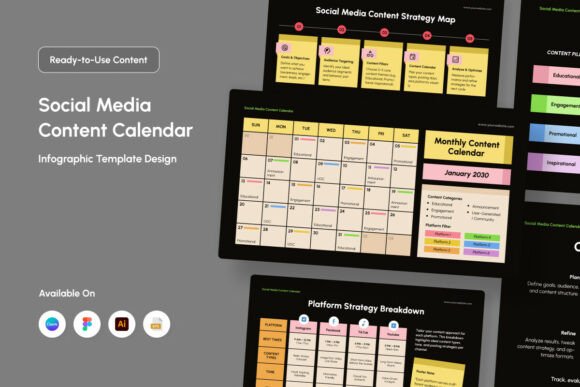
Effective social media management requires more than just creative inspiration; it demands a structured visual framework that bridges the gap between strategy and execution. The Social Media Content Calendar Infographic serves as this critical interface, transforming abstract content pillars into a tangible monthly roadmap. For digital creators, agencies, and marketers, this tool is not merely an organizational aid but a strategic asset that aligns team members, stakeholders, and clients around a unified vision. By utilizing a modern grid layout blended with playful accents, this infographic template allows professionals to outline posts, reels, and campaign highlights without getting lost in complex spreadsheet data or disjointed project management boards.
In the broader ecosystem of digital marketing, this calendar infographic functions as a central communication hub. It sits between high-level quarterly strategy documents and the granular daily task lists found in tools like Asana or Trello. While a spreadsheet tracks metadata and analytics, the visual calendar communicates tone, pacing, and aesthetic balance at a glance. This distinction is vital for maintaining brand consistency across platforms. When you can visually assess an entire month of content simultaneously, gaps in messaging become immediately apparent, and opportunities for thematic storytelling emerge naturally. The six included design variations ensure that whether you are managing a minimalist corporate LinkedIn feed or a vibrant TikTok campaign, there is a layout that matches your specific operational needs.
Integrating Visual Planning into Pre-Production Workflows
The true value of the Social Media Content Calendar Infographic emerges during the pre-production phase, before any assets are created or captions are written. During brainstorming sessions, this tool acts as a collaborative canvas rather than a rigid schedule. Teams can use the editable objects to map out content clusters, ensuring that promotional posts are balanced with educational or entertainment content. Because the files are fully layered and customizable, stakeholders can move elements around in real-time during meetings, fostering a dynamic planning environment that static PDFs cannot support.
For agencies presenting to clients, this infographic bridges the language gap between marketing strategy and creative output. Clients often struggle to visualize how individual posts contribute to a larger monthly narrative. By presenting a polished, branded calendar infographic, you provide immediate context and reassurance. The ability to customize text and colors means the planning document itself reinforces the client’s brand identity, demonstrating attention to detail before the first post goes live. This visual confirmation reduces revision cycles later in the process because expectations are aligned early through clear, graphical representation.
Cross-Platform Compatibility and Technical Flexibility
A major friction point in creative workflows is software incompatibility. Team members often prefer different tools, and clients may lack access to professional design software. This resource addresses that bottleneck by providing files in multiple industry-standard formats. The inclusion of Adobe Illustrator (.AI) and EPS files caters to designers who require vector precision for print-quality exports or deep customization. These formats maintain scalability and layer integrity, allowing for extensive modifications to the grid structure or accent elements without quality loss.
Simultaneously, the provision of Figma (.FIG) files supports modern UI/UX and digital product teams who manage social media assets within web-based design systems. Figma’s collaborative nature allows multiple users to work on the calendar simultaneously, making it ideal for remote teams. For freelancers, small business owners, and educators who may not have access to paid Adobe subscriptions, the Canva link offers an accessible entry point. This democratization of the tool ensures that the Social Media Content Calendar Infographic remains usable regardless of technical skill level or budget constraints. The RGB color profile at 72dpi further optimizes these assets specifically for screen viewing, ensuring that what you see in the editor matches exactly what appears on mobile devices and monitors.
Operational Efficiency Through Customization
Efficiency in content planning comes from reducing repetitive setup tasks. The fully customizable nature of this template system allows users to create a master file that reflects their permanent workflow requirements. Instead of rebuilding a calendar structure every month, marketers can establish a baseline with their brand colors, preferred fonts, and standard content categories pre-loaded. The use of free fonts eliminates licensing headaches and ensures that the calendar remains editable by anyone on the team without requiring additional font purchases or installations.
Beyond aesthetics, customization extends to functional adaptation. A social media manager focusing on video-heavy platforms might adjust the grid cells to accommodate thumbnail previews and reel durations, while a B2B marketer might expand text areas for article summaries and webinar dates. The editable objects allow for this structural flexibility without breaking the overall design harmony. This adaptability is crucial for long-term use; as platform algorithms shift and content strategies evolve, the calendar template can evolve alongside them rather than becoming obsolete. Maintaining a consistent visual planning system over time also builds institutional knowledge, making it easier to onboard new team members who can quickly understand the organization's content cadence through familiar visual cues.
Enhancing Quality Control and Consistency
Quality control in social media is often reactive, catching errors after publication. Integrating the Social Media Content Calendar Infographic into your review process makes quality assurance proactive. The visual format allows editors to spot repetitive visual patterns, such as using the same background color three days in a row, which might be missed in a text-only list. It also helps verify that campaign highlights are distributed evenly throughout the month rather than clustered excessively at the beginning or end.
For solo creators and hobbyists, this tool imposes a beneficial discipline. The act of filling out a structured, visually appealing calendar encourages forward thinking and prevents the burnout associated with day-to-day content scrambling. By dedicating time to populate the infographic at the start of the month, you create a psychological contract with yourself regarding output and variety. The playful accents serve a functional purpose here as well; they make the planning process feel less like administrative drudgery and more like a creative exercise, which can improve adherence to the schedule. When planning feels engaging, consistency follows naturally.
Post-Campaign Analysis and Iteration
The utility of the calendar infographic extends beyond the active publishing window. After a campaign concludes, the filled-out calendar serves as a visual archive of what was executed. Unlike buried spreadsheet rows, the graphic layout allows for rapid retrospective analysis. You can overlay performance metrics directly onto the calendar view or simply use it as a reference during debrief meetings to correlate specific content sequences with engagement spikes or drops.
This archival function supports continuous improvement. By saving previous months' calendars as templates, you preserve successful structures and layouts. If a particular week’s arrangement of reels, carousels, and stories drove exceptional results, that exact configuration can be duplicated for future campaigns. The Readme files and font info included with the download facilitate this knowledge transfer, ensuring that even if the original creator leaves the project, the system remains intelligible and operational. This transforms the Social Media Content Calendar Infographic from a disposable planning sheet into a living component of your organization's marketing infrastructure.
Practical Implementation Tips for Diverse Users
Different users will derive value from this tool in distinct ways based on their specific operational context. Educators and bloggers can use the calendar to align content with academic semesters or seasonal trends, mapping out curriculum supplements or holiday gift guides visually. Small business owners launching products can utilize the campaign highlight features to ensure launch teasers, announcements, and customer testimonials follow a logical narrative arc. Freelancers managing multiple accounts can color-code the six design variations to differentiate between clients, keeping mental models separate and organized.
When implementing this tool, start by defining your non-negotiable content pillars before opening the design file. Populate the fixed events—holidays, product launches, webinars—first, then use the flexible grid spaces to fill in supporting content. Resist the urge to overfill every cell; white space in the calendar represents necessary breathing room for community management and reactive trending content. Remember that the goal is clarity, not density. Use the layered editing capabilities to toggle visibility of different content types, allowing you to focus on one stream at a time during the planning phase. By treating the Social Media Content Calendar Infographic as a strategic dashboard rather than just a pretty template, you unlock its full potential to streamline workflows, enhance collaboration, and elevate the quality of your digital presence.