Watermelon Birthday Invitation Template for Summer Parties
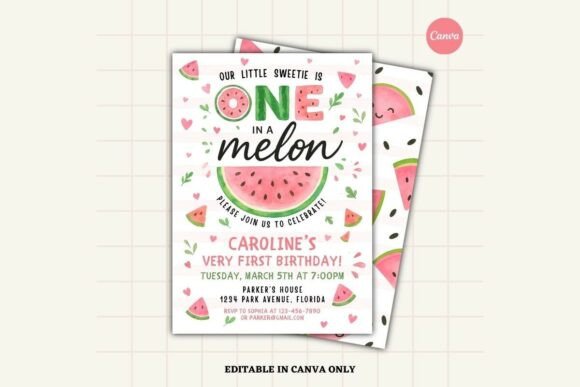
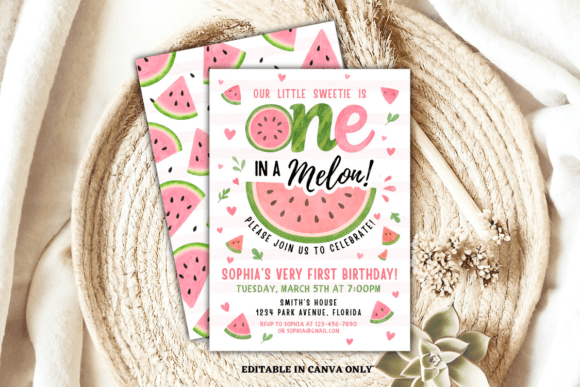
Planning a summer celebration often involves balancing vibrant aesthetics with practical logistics. The Watermelon Birthday Invitation Template offers a streamlined solution for hosts who want professional-quality stationery without the lead time or expense of custom graphic design. This editable Canva template serves as a versatile foundation for kids’ birthdays, pool parties, and seasonal gatherings, combining cheerful watermelon graphics with soft pastel tones that feel modern rather than cliché. For busy parents, educators, and event planners, this digital asset bridges the gap between DIY creativity and polished design, ensuring your invitation sets the perfect tone before guests even arrive.
Design Aesthetics and Visual Versatility
The visual language of an invitation communicates the formality and energy of an event. This template succeeds because it avoids the overly saturated, neon colors often associated with fruit-themed parties. Instead, the soft pastel palette provides a sophisticated backdrop that appeals to a broader demographic, from toddlers to adults hosting garden brunches. The watermelon elements act as playful accents rather than overwhelming patterns, leaving ample negative space for essential event details. This balance is crucial for readability and ensures the design remains legible when scaled down for mobile screens or printed on textured cardstock.
Because the layout is fully customizable, users can adapt the aesthetic to fit specific sub-themes. A "One Sweet Year" smash cake party might utilize softer pinks and rounded fonts, while a backyard BBQ could lean into deeper greens and bold sans-serif typography. The ability to change background colors and adjust element placement means the Watermelon Birthday Invitation Template functions as a flexible design system rather than a static image. This adaptability makes it a valuable resource for creators and marketers who may need to produce cohesive collateral for multiple summer events without starting from scratch each time.
Streamlining Event Communication
Beyond aesthetics, effective invitations must convey information clearly. This 5x7-inch format adheres to standard postal sizing, eliminating guesswork regarding envelopes and postage rates. For digital-first hosts, this aspect ratio translates perfectly to email attachments and social media stories. The pre-structured text hierarchy guides users to include critical data—date, time, location, RSVP details—in a logical flow. By providing this framework, the template reduces the cognitive load of drafting copy and minimizes the risk of omitting key logistical information.
Practical Applications Across Environments
While primarily designed for personal celebrations, the utility of this template extends into professional and educational contexts. Understanding these diverse applications helps maximize the return on investment for digital assets.
- Personal Celebrations: Ideal for first birthdays, gender reveals, and family reunions where a cohesive theme enhances the guest experience.
- Educational Settings: Teachers and PTA members can adapt the design for end-of-year class parties, school picnics, or summer reading program kickoffs.
- Small Business Marketing: Cafés, boutiques, and studios can rebrand the template for summer sales, open houses, or client appreciation events, maintaining brand consistency while leveraging seasonal trends.
- Content Creation: Bloggers and influencers can use the editable files as props for flat-lay photography or as downloadable freebies to grow their email lists.
- Community Organizations: Libraries and community centers can quickly produce inviting flyers for outdoor movie nights or farmers' market promotions.
In each scenario, the template’s strength lies in its efficiency. Professionals and hobbyists alike can achieve a high-end look in minutes, freeing up time to focus on event execution or content strategy rather than pixel-pushing.
Technical Accessibility and Workflow
A significant advantage of this Watermelon Birthday Invitation Template is its compatibility with free Canva accounts. Many premium templates lock essential features behind paywalls, but this resource democratizes access to quality design. Users receive a PDF containing a direct link to the template, bypassing complex file transfers or software installations. This instant-access model supports last-minute planning and iterative design changes, which are common in dynamic event environments.
The editing process is intuitive yet powerful. You can add new text blocks, swap out graphics from Canva’s extensive library, or upload your own logos and photos. Font customization allows for branding alignment, while color pickers enable precise matching to existing decor or corporate identity guidelines. For those requiring vector outputs for large-format printing or merchandise, note that SVG exports require Canva Pro; however, the included PNG, JPG, and PDF options suffice for virtually all standard invitation use cases.
Implementation Best Practices
To get the most value from this digital download, consider these practical recommendations during the customization and distribution phases. First, always proofread your customized version against the original checklist. Template placeholders sometimes contain dummy text that can be accidentally overlooked. Second, test your color choices in both RGB (screen) and CMYK (print) modes if you plan to use both formats; pastels can shift slightly between digital displays and physical ink. Third, when sharing digitally, export as a high-quality PNG for crisp text rendering on mobile devices, or as a lightweight PDF for email attachments to avoid spam filters.
For commercial users or those adapting the template for business purposes, ensure you replace all generic imagery with proprietary assets to avoid copyright issues and strengthen brand recognition. While the watermelon graphics are charming, swapping them for product photos or venue images while retaining the layout structure can create a unique asset that still benefits from the template’s proven composition. Finally, remember that this is a digital product; no physical items will be shipped. This distinction is vital for managing expectations and planning production timelines, especially if you intend to use a third-party printing service.
Downloading and File Management
Accessing your customized design is straightforward but requires attention to detail to ensure you select the correct format for your needs. Follow this standardized workflow to export your final invitation:
- Open the template via the provided PDF link and complete your edits within the Canva editor.
- Click the “Share” button located in the top-right corner of the interface.
- Select “Download” from the dropdown menu to reveal export options.
- Choose your preferred file type: PNG or JPG for digital sharing, or PDF Print for high-resolution physical copies. All these formats are available with a free account.
- If you require scalable vector graphics for professional printing or merchandise, select SVG, noting that this specific format requires a Canva Pro subscription.
By understanding both the creative potential and technical parameters of the Watermelon Birthday Invitation Template, users can efficiently produce beautiful, functional invitations that enhance any summer occasion. Whether you are a parent coordinating a backyard bash or a marketer launching a seasonal campaign, this tool offers the flexibility and polish needed to make a memorable impression.